Problem
There are a lot of people that using external workbook references during their daily work. A sales manager for example could summarize the annual sales of a department by summing 12 monthly reports that are stored in 12 different workbooks. In this way he avoids copying all the data to a single workbook, making the annual report much more compact.
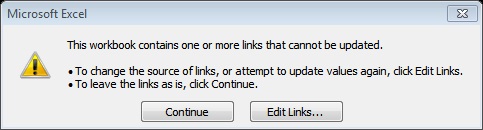
However there is a disadvantage of using external workbook references: if you move or delete one of the “independent” workbooks, then, when you reopen the “dependent” workbook, the following pop-up will appear:

There are a lot of people that using external workbook references during their daily work. A sales manager for example could summarize the annual sales of a department by summing 12 monthly reports that are stored in 12 different workbooks. In this way he avoids copying all the data to a single workbook, making the annual report much more compact.
However there is a disadvantage of using external workbook references: if you move or delete one of the “independent” workbooks, then, when you reopen the “dependent” workbook, the following pop-up will appear:
If you choose update, another pop-up will be shown:
As you can easily imagine, if you have many external references in the “dependent” workbook it can be quite difficult to update them. Moreover, if the “dependent” workbook is used by many people, there is an increased possibility for a miscalculation, especially if an external reference fails to get the updated value.
Solution
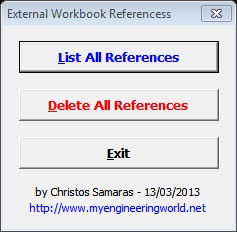
The above limitation lead me to write an Excel add-in that is capable to create a list of all the external workbook references of a workbook. In this way, the user can have a quick overview of all the references in the “dependent” workbook. Furthermore, the add-in can replace all the formulas that contain external references with their values. So, the user with a single click can clean the workbook from all the external references.
How to use it
The short video below demonstrates the add-in installation and use.
Solution
The above limitation lead me to write an Excel add-in that is capable to create a list of all the external workbook references of a workbook. In this way, the user can have a quick overview of all the references in the “dependent” workbook. Furthermore, the add-in can replace all the formulas that contain external references with their values. So, the user with a single click can clean the workbook from all the external references.
How to use it
The short video below demonstrates the add-in installation and use.
Tip
In general, I suggest you to avoid using external workbook references whenever it is possible. However, if this is impossible (for various reasons), then with this add-in you can have a clear overview of what happens in the "dependent" workbook.